Presentation workbench
The presentation workbench is an S1API-owned, in-game developer tool for tuning visual position, rotation, scale, and native icon framing without rebuilding a mod after every value change. It is not a mod-facing API and mods do not register workbench definitions.
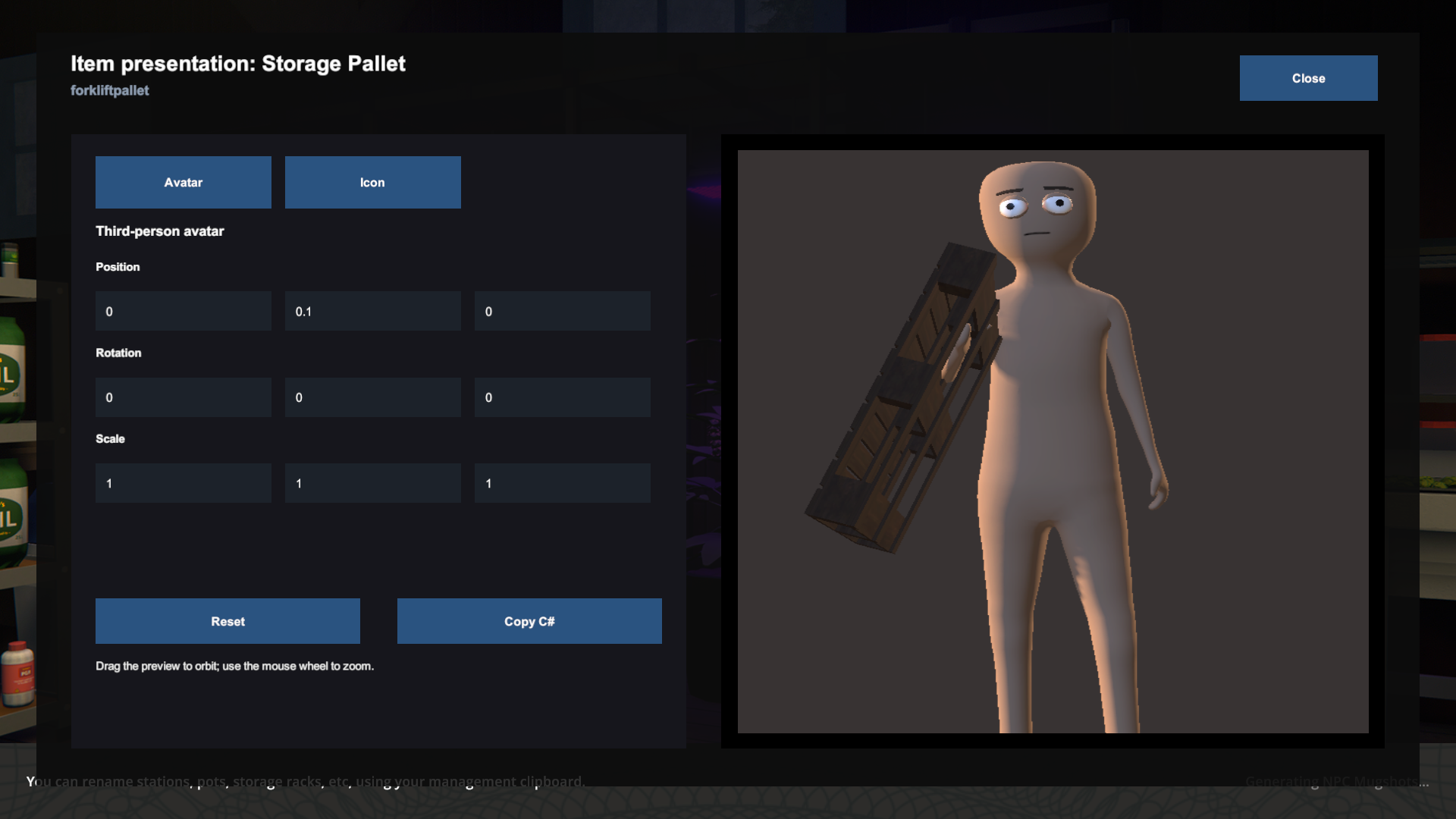
Instead, the tool discovers content that is already registered through S1API or the game:
- Product targets read existing
ProductPresentationProfileregistrations. - Item targets read the registered item definition, its equippable visual, and its linked avatar-equippable resource.
The workbench provides three context-accurate previews when the discovered target supports them:
- First person clones the visual into the local player's real viewmodel
container and assigns the
Viewmodellayer. - Avatar clones the native mugshot avatar into an isolated stage, aligns the item's linked equippable with the same alignment-point math used by the game, and renders it through a dedicated preview camera.
- Icon captures the visual through the base game's native
IconGeneratorrig. Position is intentionally omitted becauseIconFactorycenters the renderer bounds before capture.
The workbench never equips an inventory slot, mutates a registered definition, persists values, or sends an RPC. Closing it or unloading the scene destroys all preview objects and restores movement, inventory, cursor, camera, and previously visible equippable state.
Open a registered target
Open the native developer console after the local player has spawned. The explicit forms are:
presentationworkbench product example.mod:products/focus-tablet
presentationworkbench item example.mod:items/storage-pallet
presentationworkbench close
For convenience, omit the target kind to resolve a value in product, then item order:
presentationworkbench example.mod:products/focus-tablet
A consuming mod does not need initialization code for the workbench. If the target is unavailable, wait for the mod to finish its normal content registration, then run the command again.
Edit and copy values
Select a supported context, enter numeric values, and commit each field with
Enter or by moving focus. The workbench debounces icon changes before it
captures the native rig again. Fit enables bounds-based automatic scale fitting;
cameraFill controls how much of the native camera's vertical view the fitted
model occupies. Values greater than 1 intentionally crop the model.
In the avatar preview, drag with the left mouse button to orbit and use the
mouse wheel to zoom. Reset restores both the authored transform and camera.
Use Copy C# to copy an invariant-culture fragment for an existing API:
- product poses copy a
ProductPresentationTransform; - item avatar previews copy local transform assignments for the visible prefab root selected by the tool;
- icons copy
IconFactory.GenerateIconSprite(...)setup and arguments.
The tool does not write source files or change the registered content.
Product presentation profiles
Profiles registered through ProductPresentationProfileRegistry automatically
provide the held first-person preview, avatar-held preview, and generated
loose-icon preview that they support.
Use a separate avatar pose when a shared source needs different first- and third-person placement:
ProductPresentationProfile profile =
    new ProductPresentationProfileBuilder()
        .WithHeldVisual(() => visual, firstPersonPose)
        .WithAvatarHeldTransform(avatarPose)
        .WithGeneratedIconFromLooseVisual(
            size: 512,
            fitToCamera: true,
            cameraFill: 0.8f)
        .Build();
Use WithAvatarHeldVisual(provider, avatarPose) when the avatar also needs a
different source. Omitting both avatar-specific methods keeps the existing
held visual and pose behavior.
Item discovery
An item target uses the enabled renderer hierarchy under the registered
equippable as its editable visual root. If the equippable references an
AvatarEquippable, the linked registered prefab supplies the avatar tab and
its configured hand.
The item icon tab uses that same visible equippable hierarchy as a practical
icon source. Product profiles retain their exact loose-icon source and framing
settings. The workbench cannot reconstruct a transient custom icon source from
the final sprite after a mod destroys that source. Use the closest registered
product or item visual as the starting point, then paste the copied
IconFactory values into the icon-generation code.
Runtime requirements and limits
The workbench requires a spawned local player and the render-ready services in the Main or Tutorial scene. It is a local authoring aid, not a multiplayer content transfer or runtime customization protocol.
The first-person preview uses the game's actual viewmodel container, so it is the authoritative camera-space preview. The avatar panel uses a detached native mugshot rig against a neutral background; it does not mutate the local player or simulate every locomotion or animation state. Icon preview uses the authoritative native capture pipeline, including automatic centering and optional bounds fitting.